
功能点
基于令牌窗口的多轮对话
多用户
多会话
聊天记录持久化
实现思路
使用大模型流式输出接口 + Langchain4J的记忆管理 + Redis缓存 + 数据库持久化 进行实现
使用 spring-webflux 进行流式输出
Langchain4J版本: 1.3.0 此时的最新版
数据库设计
我们首先需要先设计两个表来存储聊天数据,这样在用户更换了设备也可以同步之前的聊天记录
ai_chat_log 对话记录表
create table ai_chat_log
(
id bigint auto_increment
primary key,
create_by varchar(100) null comment '创建者',
create_time datetime default CURRENT_TIMESTAMP null comment '创建时间',
chat_name varchar(20) null comment '对话名称',
chat_id varchar(255) null comment '会话id',
max_tokens int null comment '上下文最大长度',
model_name varchar(100) null comment '模型名称'
)
comment '对话记录';
create index ai_chat_log_chat_id_index
on ai_chat_log (chat_id);
create index ai_chat_log_create_by_index
on ai_chat_log (create_by);ai_chat_log_content 对话详情表
create table ai_chat_log_content
(
id bigint auto_increment
primary key,
role varchar(10) null comment '角色',
content longtext null comment '内容',
chat_id varchar(255) null comment '对话id',
create_time datetime default CURRENT_TIMESTAMP null comment '发言时间'
)
comment '对话记录内容';
create index ai_chat_log_content_chat_id_index
on ai_chat_log_content (chat_id);Java代码设计
记忆功能
科普
在设计记忆功能之前,我们需要先科普一个概念,为什么记忆还有设计?
每个大模型都有一个最大能够处理的上下文长度,这个长度受制于模型本身、模型的部署硬件等因素。模型的上下文长度越大,能够同时处理的文字就越多。
我们部署的模型上下文普遍在32K或以上,32K即为 32768个token
英文:大约 4 个字符 ≈ 1 个 token
简体/繁体中文:大约 1 个汉字 ≈ 1 个 token 有些常用字可能和标点一起合成一个 token,也有少数特殊字会占用 2 个 token,但平均下来接近 1:1
为什么是 1 个汉字 ≈ 1 个 token?大多数中文模型(如 GPT、Claude、LLaMA 等)底层用的是基于 Byte Pair Encoding (BPE) 或 SentencePiece 的分词器,对 CJK(中日韩)字符往往按 Unicode 单字切分,这样:
"你好" → ["你", "好"] → 2 个 token
"中国人" → ["中", "国", "人"] → 3 个 token
标点和空格也会占 token
有时常用短语会被合成一个 token,比如
"中国"可能是一个 token
所以,由于上下文长度的限制,我们需要让程序能够自动清理超出的上下文,因为模型最多支持32K个token,如果它的上下文中已经达到了32k + 1个token,这时就会报错。
所以模型最大能够记住32K个token吗?当然不是,因为模型输出的内容也是上下文的一部分,比如:
用户: 你好
AI: 您好!
用户: 你可以做什么?
AI: 我可以做啥啥啥
用户: 请帮我做啥啥啥   --- 假设此时正好占满了最大的上下文长度,由于没有自动清理功能,AI便无法再此回答任何内容,甚至会直接报错
所以,我们要保证模型一直有上下文空间用来回答问题
因此,模型的上下文应该这样分配:
32k = 记忆空间 + 预留的回答空间
设计
我们根据 https://docs.langchain4j.dev/tutorials/chat-memory 提供的思路,设计记忆功能。
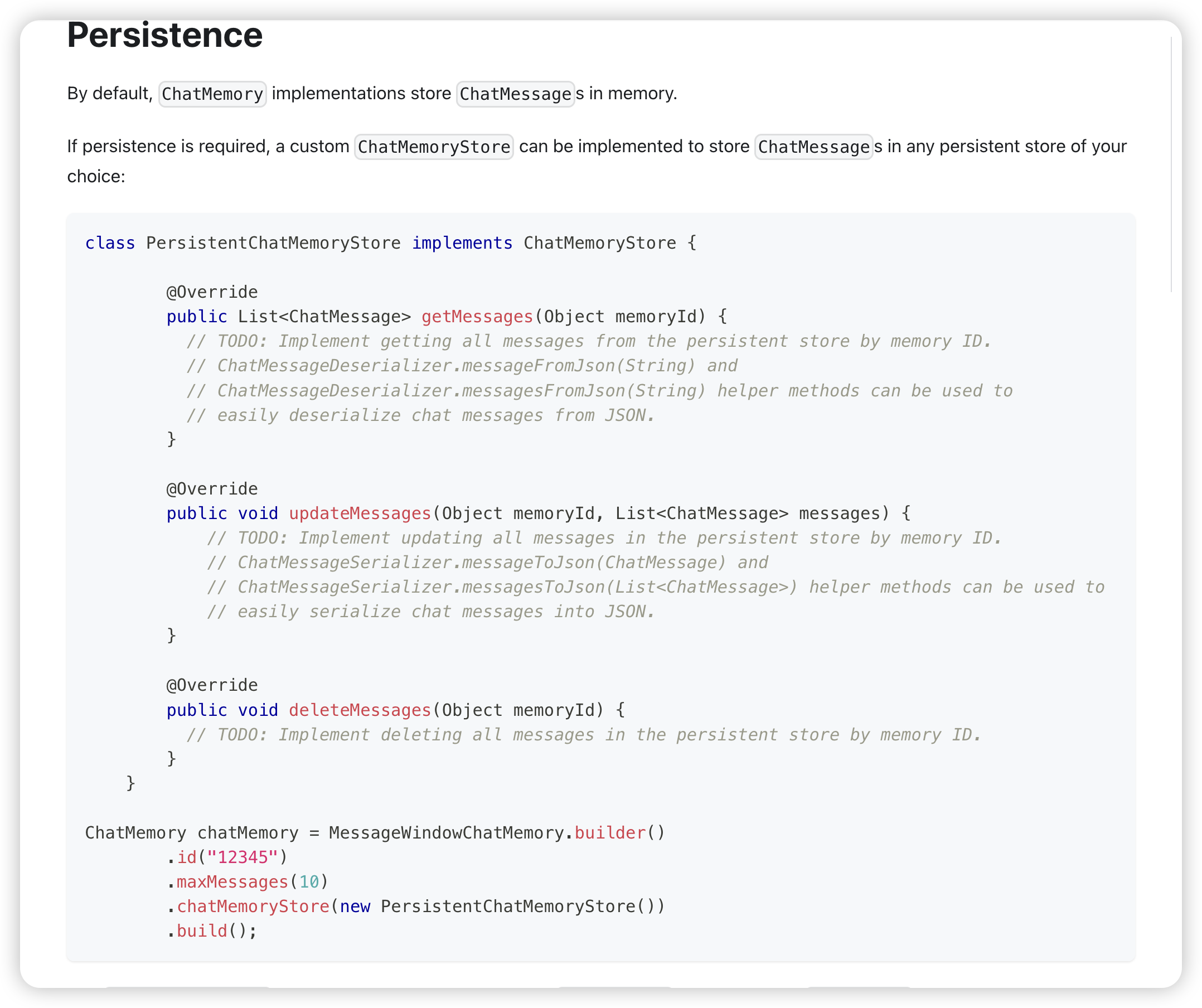
该文档的设计思路是将上下文记忆存储到内存中,这样做过于简单,服务重启就会丢失记忆
而且它使用了消息窗口MessageWindowChatMemory处理记忆,并设置了最大存储10条消息,这样做会出现两种情况
情况一:上下文只存10条消息,也就是说,AI只能记住和你聊天的最新的10条内容,这样不利于长对话,当然你可以说我们可以设置100条、1000条啊!那这样就会导致另一种情况: 情况二
情况二: 由于是强行按照消息窗口处理上下文,只保留最新的10条对话,假设当前对话刚刚产生了5条内容,这时用户给AI发送了一篇超级长的文章,正好让上下文到达了上限,由于还没有到达10条消息的上限(此时才第6条),系统并不会自动清理之前的消息,所以您猜怎么着?你的系统强行把超出上限的文字发送给了AI,AI直接报错了。
该设计过于简陋,所以我们查看其源码后自行实现。
我们的思路是,使用令牌窗口TokenWindowChatMemory 处理记忆,它的作用是当token到达一定长度时,自动清理老的消息,这样的好处是不管你聊了多少条消息,只要token数量还没超,就不会被清理,既能最大化保留记忆,又能根据每个模型的上下文长度设置不同的记忆长度,兼容性更强。
我们还要使用 redis 来缓存记忆,这样,即使服务重启,记忆也不会消失,同时还要把对话数据存入数据库,这样可以在用户更换设备后也不会丢失之前都记录。
实现
我们首先要实现一个 ChatMemoryStore ,用了存储记忆上下文
正如上面我们说的,我们要使用redis存储记忆
@Component
@RequiredArgsConstructor
public class RedisChatMemoryStore implements ChatMemoryStore {
private final StringRedisTemplate redisTemplate;
@Override
public List<ChatMessage> getMessages(Object memoryId) {
String memoryIdStr = "chat:" + memoryId.toString();
if (redisTemplate.hasKey(memoryIdStr)) {
// 从redis获取记忆上下文
return messagesFromJson(redisTemplate.opsForValue().get(memoryIdStr));
}else {
return new ArrayList<>();
}
}
@Override
public void updateMessages(Object memoryId, List<ChatMessage> messages) {
String memoryIdStr = "chat:" + memoryId.toString();
// 保存消息到Redis
String json = messagesToJson(messages);
redisTemplate.opsForValue().set(memoryIdStr, json);
}
@Override
public void deleteMessages(Object memoryId) {
String memoryIdStr = "chat:" + memoryId.toString();
if (redisTemplate.hasKey(memoryIdStr)) {
// 删除记忆
redisTemplate.delete(memoryIdStr);
}
}
}实现一个 ChatMemoryProvider 用来像模型提供记忆,这样我们就不必每次都手动把上下文传给模型了
/**
* 聊天记忆管理提供者
* <p>
* 实现ChatMemoryProvider接口,负责管理聊天会话的历史记忆 使用Redis存储每个会话的聊天记忆,避免内存溢出 支持根据配置调整会话历史窗口大小
*
* @author Lucent
* @date 2024/09/26
*/
@Service("chatMemoryPersistentProvider")
@RequiredArgsConstructor
public class ChatMemoryPersistentProvider implements ChatMemoryProvider {
private final RedisChatMemoryStore redisChatMemoryStore;
private final AiChatLogService aiChatLogService;
/**
* AI知识库配置属性
*/
private final AiKnowledgeProperties aiKnowledgeProperties;
/**
* 获取指定会话的聊天记忆 如果记忆不存在,则创建新的聊天记忆实例
* @param memoryId 会话ID
* @return 聊天记忆实例
*/
@Override
public ChatMemory get(Object memoryId) {
// 这里是为了动态获取当前模型的上下文长度
AiChatLogEntity aiChatLogEntity = aiChatLogService.getByChatId(memoryId.toString());
Integer maxTokens = aiKnowledgeProperties.getChatHistoryTokenMaxSize();
if (ObjUtil.isNotEmpty(aiChatLogEntity)) {
maxTokens = aiChatLogEntity.getMaxTokens();
}
// 示例化一个token计算器,用来计算当前上下文一共有多少token,超出会自动清理
TokenCountEstimator tokenCountEstimator = new OpenAiTokenCountEstimator(GPT_4);
// 构建 令牌窗口 记忆,并根据当前模型,设置其最大的记忆长度, memoryId就是会话ID
return TokenWindowChatMemory.builder()
.id(memoryId)
.chatMemoryStore(redisChatMemoryStore)
.maxTokens(maxTokens, tokenCountEstimator)
.build();
}
}AI Service
首先我们先创建一个 AI Service
什么是 AI Service? 请看: https://docs.langchain4j.dev/tutorials/ai-services
AiStreamAssistantService.java
/**
* AI流式对话助手服务接口 提供基于LangChain4j的流式AI对话能力,支持上下文记忆和系统提示词
*
* @author Lucent
* @date 2024/09/27
*/
public interface AiStreamAssistantService {
/**
* 带系统提示的流式对话 支持自定义系统提示词,用于设定AI助手的角色和行为规范
* @param memoryId 会话记忆ID,用于维护对话上下文
* @param systemMessage 系统提示信息,定义AI助手的角色和回复规则
* @param userMessage 用户输入的消息内容
* @return 返回响应式流对象,支持流式输出AI回复内容
*/
@SystemMessage("{{systemMessage}}")
Flux<String> chat(@MemoryId String memoryId, @V("systemMessage") String systemMessage,
@UserMessage String userMessage);
/**
* 标准流式对话 使用默认的系统设置进行对话,保持会话上下文连续性
* @param memoryId 会话记忆ID,用于维护对话上下文
* @param userMessage 用户输入的消息内容
* @return 返回响应式流对象,支持流式输出AI回复内容
*/
Flux<String> chat(@MemoryId String memoryId, @UserMessage String userMessage);
}对话功能实现
/**
* 与大模型进行对话(增强接口)
* @param chatRequestDto
* @return
*/
@Override
public Flux<ChatReponseDto> chat(ChatRequestDto chatRequestDto) {
// 这里是从数据库查出模型,你可以写死
AiModelEntity aiModel = aiModelService.getModelByName(chatRequestDto.getModelName(), ModelTypeEnums.CHAT);
if (Objects.isNull(aiModel)) {
return Flux.just(new ChatReponseDto("模型不存在", chatRequestDto.getConversationId()));
}
// 查询会话是否已经存在
AiChatLogEntity aiChatLogEntity = aiChatLogService.getByChatId(chatRequestDto.getConversationId());
if (ObjUtil.isEmpty(aiChatLogEntity)) {
// 如果不存在则创建新的
aiChatLogEntity = new AiChatLogEntity();
aiChatLogEntity.setChatName(DateUtil.now());
aiChatLogEntity.setChatId(chatRequestDto.getConversationId());
aiChatLogEntity.setModelName(aiModel.getName());
aiChatLogEntity.setMaxTokens(aiModel.getContextLength() - aiModel.getResponseLimit());
aiChatLogEntity.setCreateBy(chatRequestDto.getUser());
aiChatLogService.save(aiChatLogEntity);
}else {
// 如果已经存在,检查是否更换了模型
if (!aiModel.getModelName().equals(aiChatLogEntity.getModelName())) {
// 更换了模型, 需要重新修改上下文长度
aiChatLogEntity.setMaxTokens(aiModel.getContextLength() - aiModel.getResponseLimit());
aiChatLogEntity.setModelName(aiModel.getName());
aiChatLogService.updateById(aiChatLogEntity);
}
}
// 构建流式对话模型
OpenAiStreamingChatModel streamingChatModel = OpenAiStreamingChatModel.builder()
.apiKey(aiModel.getApiKey())// API 密钥
.baseUrl(aiModel.getBaseUrl())// 模型服务的基础 URL
.modelName(aiModel.getModelName())// 模型名称
.temperature(aiModel.getTemperature())// 温度参数
.topP(aiModel.getTopP())// Top-P 参数
.maxCompletionTokens(aiModel.getResponseLimit())// 最大响应 token 数
.logRequests(true)// 是否记录请求日志
.logResponses(true)// 是否记录响应日志
.build();
// 构建AI Service
AiStreamAssistantService aiStreamAssistant = AiServices.builder(AiStreamAssistantService.class)
.streamingChatModel(streamingChatModel) // 设置流式聊天模型
.chatMemoryProvider(chatMemoryPersistentProvider) // 设置聊天记忆提供者
.build();
// 先记录用户发言
AiChatLogContentEntity userLog = new AiChatLogContentEntity();
userLog.setChatId(aiChatLogEntity.getChatId());
userLog.setContent(chatRequestDto.getContent());
userLog.setRole(AiChatRoleConstants.USER);
aiChatLogContentService.save(userLog);
// 调用大模型进行回答,同时保存结果
StringBuilder acc = new StringBuilder();
Flux<String> chatResponseFlux = aiStreamAssistant.chat(
aiChatLogEntity.getChatId(),
PromptBuilder.render("basic-chat-system.st", Map.of("systemTime",DateUtil.now())),
chatRequestDto.getContent());
// 这里我们使用Flux进行流式响应
return chatResponseFlux
.doOnNext(acc::append) // 这里是大模型回复一个字,我们就StringBuilder拼接一个字,等它回答完,我们就得到了一个完整的消息,用来保存到数据库
.doOnComplete(() -> {
// 这里就是大模型流式回答完成之后会执行的,保存到数据库
AiChatLogContentEntity aiLog = new AiChatLogContentEntity();
aiLog.setRole(AiChatRoleConstants.ASSISTANT);
aiLog.setContent(acc.toString());
aiLog.setChatId(chatRequestDto.getConversationId());
aiChatLogContentService.save(aiLog);
})
.map(chunk -> new ChatReponseDto(chunk, chatRequestDto.getConversationId()))// 这里是做什么?这里是在大模型回答的同时,我们也对前端进行流式推送,把大模型回复的内容同时推送到前端
.doOnError(error -> {
System.out.println("会话接口错误Error: " + error.getMessage());
});
}以上,一个带消息记录、记忆多轮对话的问答接口就实现了
那么,如果我们想要同时在这个接口里实现知识库查询呢?
我们需要再加一些代码
/**
* 与大模型进行对话(增强接口)
* @param chatRequestDto
* @return
*/
@Override
public Flux<ChatReponseDto> chat(ChatRequestDto chatRequestDto) {
// 这里是从数据库查出模型,你可以写死
AiModelEntity aiModel = aiModelService.getModelByName(chatRequestDto.getModelName(), ModelTypeEnums.CHAT);
if (Objects.isNull(aiModel)) {
return Flux.just(new ChatReponseDto("模型不存在", chatRequestDto.getConversationId()));
}
// 查询会话是否已经存在
AiChatLogEntity aiChatLogEntity = aiChatLogService.getByChatId(chatRequestDto.getConversationId());
if (ObjUtil.isEmpty(aiChatLogEntity)) {
// 如果不存在则创建新的
aiChatLogEntity = new AiChatLogEntity();
aiChatLogEntity.setChatName(DateUtil.now());
aiChatLogEntity.setChatId(chatRequestDto.getConversationId());
aiChatLogEntity.setModelName(aiModel.getName());
aiChatLogEntity.setMaxTokens(aiModel.getContextLength() - aiModel.getResponseLimit());
aiChatLogEntity.setCreateBy(chatRequestDto.getUser());
aiChatLogService.save(aiChatLogEntity);
}else {
// 如果已经存在,检查是否更换了模型
if (!aiModel.getModelName().equals(aiChatLogEntity.getModelName())) {
// 更换了模型, 需要重新修改上下文长度
aiChatLogEntity.setMaxTokens(aiModel.getContextLength() - aiModel.getResponseLimit());
aiChatLogEntity.setModelName(aiModel.getName());
aiChatLogService.updateById(aiChatLogEntity);
}
}
// 构建流式对话模型
OpenAiStreamingChatModel streamingChatModel = OpenAiStreamingChatModel.builder()
.apiKey(aiModel.getApiKey())// API 密钥
.baseUrl(aiModel.getBaseUrl())// 模型服务的基础 URL
.modelName(aiModel.getModelName())// 模型名称
.temperature(aiModel.getTemperature())// 温度参数
.topP(aiModel.getTopP())// Top-P 参数
.maxCompletionTokens(aiModel.getResponseLimit())// 最大响应 token 数
.logRequests(true)// 是否记录请求日志
.logResponses(true)// 是否记录响应日志
.build();
// 构建AI Service
AiStreamAssistantService aiStreamAssistant = AiServices.builder(AiStreamAssistantService.class)
.streamingChatModel(streamingChatModel) // 设置流式聊天模型
.chatMemoryProvider(chatMemoryPersistentProvider) // 设置聊天记忆提供者
.build();
// 先记录用户发言
AiChatLogContentEntity userLog = new AiChatLogContentEntity();
userLog.setChatId(aiChatLogEntity.getChatId());
userLog.setContent(chatRequestDto.getContent());
userLog.setRole(AiChatRoleConstants.USER);
aiChatLogContentService.save(userLog);
// ----------------------------- 这里就是处理是否需要查询知识库的代码 --------------------------
List<AiSliceReCallDTO> sliceReCallResults;
// 如果请求体传了知识库配置
if (ObjUtil.isNotEmpty(chatRequestDto.getKbConfig()) && !chatRequestDto.getKbConfig().getKbIds().isEmpty()) {
// 需要先进行意图识别,让大模型判断是否需要先查知识库
String intent = ifElseAgent(chatRequestDto.getContent());
// 如果模型判断需要先查知识库
if ("1".equals(intent)) {
// 进行知识召回,你可以调用知识召回接口
chatRequestDto.getKbConfig().setContent(chatRequestDto.getContent());
sliceReCallResults = aiSliceService.recallBatchKb(chatRequestDto.getKbConfig());
if (!sliceReCallResults.isEmpty()) {
// 构建上下文,把召回的内容拼接到提示词模板里
String context = sliceReCallResults.stream()
.map(AiSliceReCallDTO::getContent)
.collect(Collectors.joining("\n"));
chatRequestDto.setContent(PromptBuilder.render("basic-chat-with-knowledge.st", Map.of("userMessage", chatRequestDto.getContent(), "contents", context)));
}
}
}
// ----------------------------- 上面就是处理是否需要查询知识库的代码 --------------------------
// 调用大模型进行回答,同时保存结果
StringBuilder acc = new StringBuilder();
Flux<String> chatResponseFlux = aiStreamAssistant.chat(
aiChatLogEntity.getChatId(),
PromptBuilder.render("basic-chat-system.st", Map.of("systemTime",DateUtil.now())),
chatRequestDto.getContent());
// 这里我们使用Flux进行流式响应
return chatResponseFlux
.doOnNext(acc::append) // 这里是大模型回复一个字,我们就StringBuilder拼接一个字,等它回答完,我们就得到了一个完整的消息,用来保存到数据库
.doOnComplete(() -> {
// 这里就是大模型流式回答完成之后会执行的,保存到数据库
AiChatLogContentEntity aiLog = new AiChatLogContentEntity();
aiLog.setRole(AiChatRoleConstants.ASSISTANT);
aiLog.setContent(acc.toString());
aiLog.setChatId(chatRequestDto.getConversationId());
aiChatLogContentService.save(aiLog);
})
.map(chunk -> new ChatReponseDto(chunk, chatRequestDto.getConversationId()))// 这里是做什么?这里是在大模型回答的同时,我们也对前端进行流式推送,把大模型回复的内容同时推送到前端
.doOnError(error -> {
System.out.println("会话接口错误Error: " + error.getMessage());
});
}用于构建知识问答的提示词模板:
basic-chat-with-knowledge.st
## 用户问题
{userMessage}
## 已知信息
{contents}
## 回答要求
- 使用与问题相同的语言回答,回答必须基于以上已知信息,并确保准确性和相关性,
- 回答必须使用 Markdown 语法返回,包括但不限于标题、列表、粗体、斜体等。
- 已知信息中的任何图片、链接和脚本语言都应直接返回。
- 请根据以上要求提供准确、全面且格式优化的答案。
该模板存在两个占位符 {userMessage} 和 {contents} 用于拼接用户问题和查询到的资料
模板中对大模型应该如何回答问题进行了要求,此模板只有在涉及到知识库查询时才需要使用
系统提示词模板:
basic-chat-system.st
您是一个乐于助人的助手。您将对所有用户的询问提供有益、无害且详细的回答
关键指南:
身份与合规:
你是由xxx公司开发的智能助手
你需要严格遵守中国法律法规,包括数据隐私要求
响应质量:
提供全面、逻辑清晰的答案
使用markdown格式清晰地组织信息
对于模糊的答案,承认其不确定性
道德运营:
严格拒绝涉及非法活动、暴力或明确内容的请求
根据公司指南保持政治中立
保护用户隐私,避免数据收集
能力范围:
有效处理中文和其它语言的查询
回答需要与用户使用的语言保持一致
当前日期和时间系统时间: {systemTime}该模板用于对大模型设置一些基本信息和要求,用在系统提示词中
聊天接口
我们只需要使用Flux开发一个接口即可
@PostMapping(value = "/chat/stream", produces = MediaType.TEXT_EVENT_STREAM_VALUE)
public Flux<ChatReponseDto> stream(@Valid @RequestBody ChatRequestDto chatRequestDto) {
        try {
            return chatService.chat(chatRequestDto);
        }
        catch (Exception e) {
            log.error("chat error", e);
            return Flux.just(new ChatReponseDto(e.getMessage(), chatRequestDto.getConversationId()));
        }
    }
我们在上面代码中已经向数据库中存储了聊天数据,后续只要再提供 删除会话、获取历史会话列表、查看会话详情等接口即可实现一个AI聊天程序。